
When my niece started a new babysitting job last week, the first thing she did after the parents left for work was to look around for where their nanny cam might be hidden. “These people are rather sophisticated and work long hours, so they’re probably the type of parents who would use a nanny cam,†she explained. “Of course I have nothing to hide, but I would sure like to know which teddy bear is taking pictures of me!â€
Little did my niece know that the days of the traditional teddy bear nanny cam are long gone. Today, there are a wide range of covert surveillance cameras for in-home use — popularly know as “nanny cams‖ hidden inside a variety of common household objects. And, nearly all of today’s nanny cams have gone digital, which means that their recording and viewing capabilities are more sophisticated, and their prices have dropped too.
If you are thinking about getting a nanny cam so you can keep an eye on your child care provider, or to monitor the aide taking care of an elderly relative, or to observe any other activity in your home when you’re not around, here’s what you need to know:
Advancements in Nanny Cams
Early versions of nanny cams were hidden inside objects typically found in a child’s bedroom, like a teddy bear. But manufacturers realized that teddy bears and other toys can look out-of-place in rooms outside the nursery. They also recognized that in-home surveillance has expanded beyond just monitoring babysitters.
Today, nanny cams are hidden inside all kinds of objects and appliances that can be placed discreetly around the house and blend in with their surroundings, such as clocks, smoke detectors and digital picture frames.
The latest and greatest nanny cams are digital, making them wireless and self-contained. Most are motion-activated, which means that the unit only records when there is movement in the room. This feature maximizes hours of recording.
Choosing the Right Nanny Cam
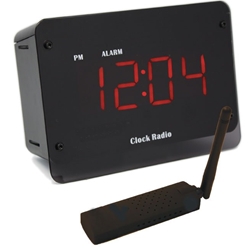 The easiest way to choose the right nanny cam is to decide: when you want to view the video (i.e., live or later); how you want to view the video (on a PC, smart phone, TV or monitor); and where you want to hide the nanny cam (so you can pick an object that blends in with the room’s décor).
â— View Live Remotely — If you want to be able to watch the activity in your home live on your PC or smart phone from anywhere, a nanny cam with a digital wireless IP receiver is the way to go. For instance, the SleuthGear Covert Digital Wireless Cube Alarm Clock Hidden Camera With Remote View streams video live over the Internet through your router so you can watch your child and care giver interact in real time. (Note that you must have high speed Internet access on both ends.)
â— View Later Locally — If you don’t need to see live video, choose a nanny cam with a built-in DVR that uses a removable SD (secure digital) card to record activity. When you are ready to retrieve the video, just remove the SD card and you can play back the files on your PC.
One popular model by KJB Security is the  Xtreme Life Teddy Bear nanny cam that features a PIR heat sensor to conserve battery life.  Video recording kicks in only when body heat motion is detected. With no visible wires, this battery-operated hidden camera system allows you to place the teddy bear anywhere so you can begin surveillance immediately. Captured video is stored on the removable SD card.
â— View Live Locally – If you only want to view the action locally when you are at home, choose a nanny cam that transmits video to a portable screen so you can watch the live action from another room. Levana makes several baby monitors that can be used for surveillance.
Summary
With so many innocuous looking models to choose from, many businesses are also using digital wireless nanny cams to monitor personnel, contractors and general activity in their office. Its easy to pick a nanny cam that blends in with your room’s surroundings – which is making it harder and harder for babysitters like my niece to identify which household object is the really a nanny cam!